← 返回首页
学习日记
学习开发小程序的第一天
第一次完成微信小程序 Hello World,并实现中英文文字切换。
姓名:陈东汉 学号:24020007006
| 姓名和学号 |
陈东汉,24020007006 |
| 本实验属于哪门课程 |
中国海洋大学26夏《移动软件开发》 |
| 实验名称 |
实验1:第一个微信小程序 |
一、实验内容
本实验完成了第一个微信小程序 Hello World 的设计与实现。
首先安装微信开发者工具,并创建一个新的微信小程序项目。通过修改页面中的 wxml、wxss 和 js 文件,实现了一个简单的文字切换功能。
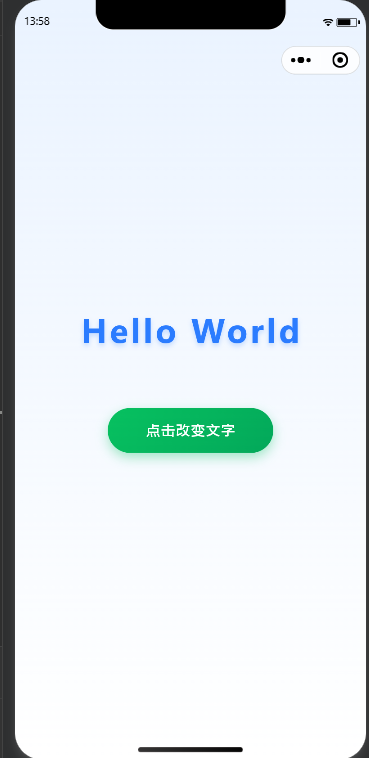
程序初始显示:
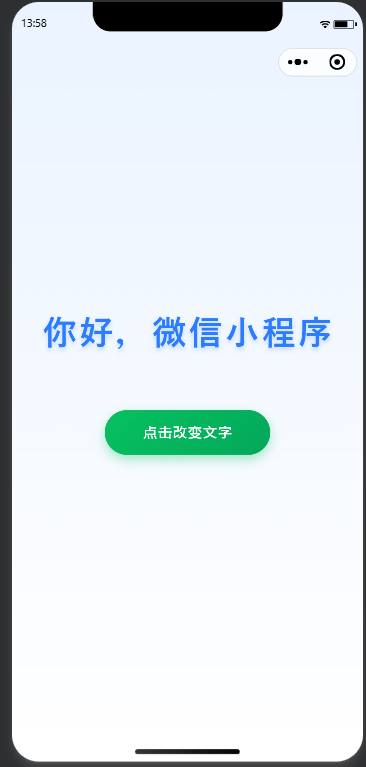
点击按钮后:
再次点击按钮可以恢复原来的英文显示。
本实验主要使用以下三个文件:
- index.wxml:负责页面结构;
- index.wxss:负责页面样式;
- index.js:负责页面逻辑。
1. index.wxml
1
2
3
4
5
6
7
8
9
10
11
12
13
14
15
| <view class="container">
<view class="text">
{{message}}
</view>
<button
class="change-button"
hover-class="change-button-hover"
bindtap="changeText"
>
点击改变文字
</button>
</view>
|
2. index.wxss
1
2
3
4
5
6
7
8
9
10
11
12
13
14
15
16
17
18
19
20
21
22
23
24
25
26
27
28
29
30
31
32
33
34
35
36
37
38
39
40
41
42
43
44
45
46
47
48
49
50
51
52
53
54
55
56
57
58
59
60
61
62
63
64
65
66
67
68
69
70
71
72
73
| .container {
height: 100vh;
display: flex;
flex-direction: column;
align-items: center;
justify-content: center;
padding-bottom: 200rpx;
background: linear-gradient(180deg, #eaf3ff 0%, #ffffff 100%);
}
.text {
font-size: 72rpx;
font-weight: bold;
color: #2b7cff;
letter-spacing: 6rpx;
margin-bottom: 120rpx;
text-shadow: 0 6rpx 16rpx rgba(43, 124, 255, 0.25);
animation: fadeIn 1s ease;
}
@keyframes fadeIn {
from {
opacity: 0;
transform: translateY(30rpx);
}
to {
opacity: 1;
transform: translateY(0);
}
}
.change-button {
width: 340rpx;
height: 96rpx;
line-height: 96rpx;
border-radius: 48rpx;
font-size: 32rpx;
color: #ffffff;
background: linear-gradient(135deg, #07c160, #03a85a);
box-shadow: 0 10rpx 24rpx rgba(7, 193, 96, 0.35);
}
.change-button::after {
border: none;
}
.change-button-hover {
background: linear-gradient(135deg, #06ad56, #02914c);
transform: scale(0.96);
box-shadow: 0 6rpx 12rpx rgba(7, 193, 96, 0.25);
}
|
3. index.js
1
2
3
4
5
6
7
8
9
10
11
12
13
14
15
16
17
18
19
20
21
22
23
24
25
26
27
28
29
30
31
32
| Page({
data: {
message: "Hello World"
},
changeText: function () {
if (this.data.message === "Hello World") {
this.setData({
message: "你好,微信小程序"
});
} else {
this.setData({
message: "Hello World"
});
}
}
});
|
程序运行截图:
点击按钮后的效果:
二、问题总结与体会
在本次实验中,我学习了微信小程序开发工具的使用方法,并完成了第一个微信小程序项目。实验过程中遇到的问题主要是在创建项目时出现配置错误,通过检查项目配置和重新创建项目后解决。
通过本次实验,我了解了微信小程序的基本开发流程,掌握了 wxml、wxss 和 js 三个文件的作用。其中,wxml 负责页面结构,wxss 负责页面样式,js 负责页面逻辑。
同时,通过使用 Typora 编写 Markdown 格式实验报告,提高了实验记录和文档整理能力。